
Survey Solutions records answers to geography-type questions as series of coordinates of points. During export the user can select the desired format for writing these coordinates to files in the workspace settings.
Survey Solutions Geometry String
In the early versions the coordinates were exported as arrays following this pattern:
longitude1,lattitude1;longitude2,lattitude2;...longitudeN,lattitudeN
This format (Survey Solutions Geometry String) contains all the collected data in a compact form, but lacks some of the information needed for properly visualizing the data, such as whether the sequence describes a polyline or a polygon. This information is contained in the metainformation contained in the questionnaire, which is exported with the data files, but requires additional processing steps.
Here is an example of a plot boundary described in this format:
-77.04247256224234,38.900061573438265;
-77.0420438316804,38.90006450310358;
-77.0419932205604,38.9000505058127;
-77.04195641247313,38.900029672630474;
-77.04193759015577,38.90000167803224;
-77.04192587849164,38.89996619649071;
-77.04193006122884,38.899936899791676;
-77.04196268657891,38.89988253810701;
-77.04197858098023,38.89986593662615;
-77.04199907639246,38.899863657991226;
-77.04249180283341,38.90004692510994;
-77.04249326679141,38.9000560396257
In this illustration the line breaks were added for readability. Survey Solutions doesn’t include line breaks in this string. See the raw file exactly as exported.
Well-Known Text
Recently added alternative formats include this information into the data content making it more suitable for immediate processing.
The new default is the WKT format, aka Well-Known Text originally developed by the Open Geospatial Consortium (OGC). Here is a quick reference to the Wikipedia article describing the format. The strict definition of the format is contained in OpenGIS® Implementation Standard for Geographic information - Simple feature access - Part 1: Common architecture
The same plot boundary will export like the following when WKT is selected:
POLYGON((
  -77.04247256224234 38.900061573438265,
  -77.0420438316804 38.90006450310358,
  -77.0419932205604 38.9000505058127,
  -77.04195641247313 38.900029672630474,
  -77.04193759015577 38.90000167803224,
  -77.04192587849164 38.89996619649071,
  -77.04193006122884 38.899936899791676,
  -77.04196268657891 38.89988253810701,
  -77.04197858098023 38.89986593662615,
  -77.04199907639246 38.899863657991226,
  -77.04249180283341 38.90004692510994,
  -77.04249326679141 38.9000560396257,
  -77.04247256224234 38.900061573438265
))
In this illustration the line breaks were added for readability. Survey Solutions doesn’t include line breaks in this string. See the raw file exactly as exported.
Note that in exporting area features Survey Solutions will always write the
feature type as POLYGON, not utilizing e.g. TRIANGLE even if the original
contained exactly 3 vertices.
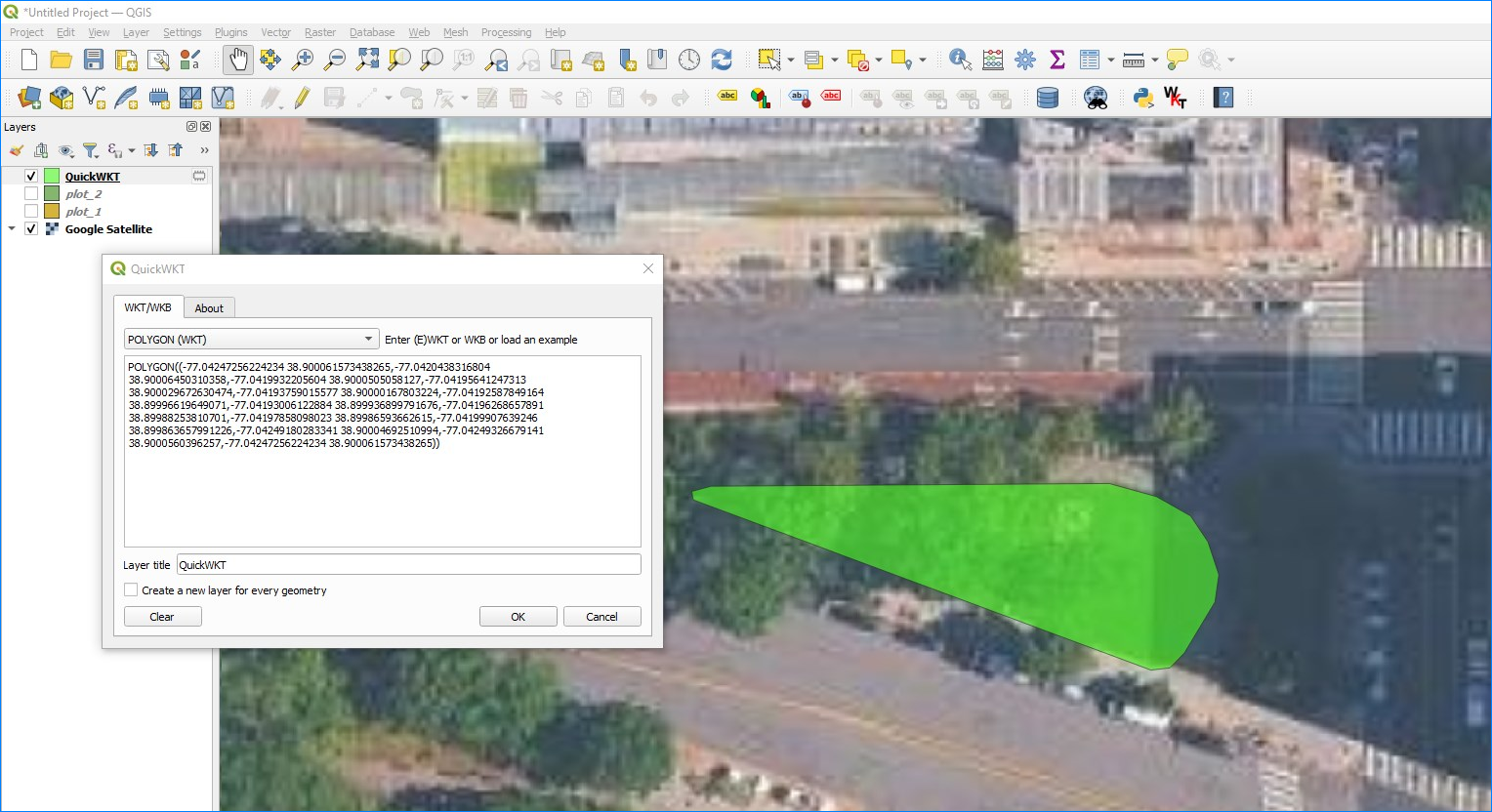
Visualization of WKT formatted features is readily available online and offline. For example, in QGIS one can utilize the QuickWKT plugin by Alessandro Pasotti (ItOpen):
GeoJSON
Survey Solutions can also export the same data formatted in GeoJSON - an open standard format designed for representing simple geographical features. GeoJSON file format can be understood from the following Wikipedia article: GeoJSON. The standard itself is described rigorously in the following publication: RFC7946.
"{""type"":""Polygon"",""coordinates"":[[[-77.04247256224234,38.900061573438265],[-77.0420438316804,38.90006450310358],[-77.0419932205604,38.9000505058127],[-77.04195641247313,38.900029672630474],[-77.04193759015577,38.90000167803224],[-77.04192587849164,38.89996619649071],[-77.04193006122884,38.899936899791676],[-77.04196268657891,38.89988253810701],[-77.04197858098023,38.89986593662615],[-77.04199907639246,38.899863657991226],[-77.04249180283341,38.90004692510994],[-77.04249326679141,38.9000560396257],[-77.04247256224234,38.900061573438265]]]}"
See the raw file exactly as exported.
Note that the content as saved in the exported data has enveloping double quotes around the content and the inner double quotes are duplicated. The software reading these files must support this content formatting. This recorded structure is equivalent to this formatted JSON:
{
  "type": "Polygon",
  "coordinates": [
    [
      [
        -77.04247256224234,
        38.900061573438265
      ],
      [
        -77.0420438316804,
        38.90006450310358
      ],
      [
        -77.0419932205604,
        38.9000505058127
      ],
      [
        -77.04195641247313,
        38.900029672630474
      ],
      [
        -77.04193759015577,
        38.90000167803224
      ],
      [
        -77.04192587849164,
        38.89996619649071
      ],
      [
        -77.04193006122884,
        38.899936899791676
      ],
      [
        -77.04196268657891,
        38.89988253810701
      ],
      [
        -77.04197858098023,
        38.89986593662615
      ],
      [
        -77.04199907639246,
        38.899863657991226
      ],
      [
        -77.04249180283341,
        38.90004692510994
      ],
      [
        -77.04249326679141,
        38.9000560396257
      ],
      [
        -77.04247256224234,
        38.900061573438265
      ]
    ]
  ]
}
Accompanying variables
For any question Q of
geography type, the
export from Survey Solutions will contain the string variable Q with
coordinates data (in one of the formats described above) accompanied with the
following additional variables:
Q__area - calculated area (in square meters) of the selected polygon or a
0 (zero value) if the geometry type is anything different from polygon;
Q__len - length (in meters) of the selected polygon or polyline, or a 0
(zero value) if the geometry type is anything different from polygon or polyline;
Q__num - number of recorded points. Note that the first point is always added
as the last point when exporting polygons to WKT or GeoJSON formats to guarantee
that the polygon is closed. (This means that the number of actual points in such
features will be 1 more than is recorded in this variable.)
Q__racc - requested accuracy (in meters) effective at the time when the
question was answered if the input method for Q was automatic or semi-automatic,
otherwise a system missing value;
Q__rfrq - requested frequency (in seconds) effective at the time when the
question was answered or a system missing if the input method is not automatic.
Please note that if the question was not answered, then all of the above fields will take values mentioned as ‘reserved values’ in the Missing values article.
Notice for API users
The format of export of the geography questions is not selectable via the export API because it is set in the workspace settings and regulates all exports from that workspace, whether requested interactively from the user interface or from an API query.
If an export in a specific format is needed for applications acquiring data from Survey Solutions, that format needs to be set in the workspace settings by the administrator user. For applications requiring the data to be exported in the old format that setting must be set to: Survey Solutions Geometry String.